
第4回 移動処理を整理しよう
第4回 移動処理を整理しよう
前回は、WASDごとに移動先を直接計算しました。
W : nextPos.y = playerPos.y - 1;
A : nextPos.x = playerPos.x - 1;
S : nextPos.y = playerPos.y + 1;
D : nextPos.x = playerPos.x + 1;
4つを見比べると、やっていることはどれも、
現在位置に「どちらへ1マス進むか」を足す
という同じ処理です。
今回は、この重複を整理します。
今回の流れ
W / A / S / D
      ↓
移動する方向に変換
      ↓
方向ごとのx・y変化量を取り出す
      ↓
現在位置 + 変化量
      ↓
次のマスを求める
これをやることで何がいいのかというと、 せっかくpoint型があるんだから、移動先までの差分(右に移動するなら今の座標に(1,0)足せばいいよね)を足すことによって全部の移動が、
point currPos;//現在の座標
point nextPos;//移動後の座標
point moveDir;//移動量を表すベクトル

nextPos = currPos + moveDir
この形で表せるようになるよね!ってところです。(これはとても大事)
1.移動方向に名前を付けよう
まず、上下左右と「入力なし」をDirectionとしてまとめます。
OBJECT_CHARの下へ追加してください。
enum Direction
{
    DIR_UP,
    DIR_LEFT,
    DIR_DOWN,
    DIR_RIGHT,
    DIR_NONE
};
定義するときはenum Directionですが、使うときは、
Direction dir;
と書きます。
第4回で新しく追加する関数は、キー入力をDirectionへ変換するGetDirection()です。
DrawStageText()の宣言の下へ追加してください。
Direction GetDirection(void);
2.方向を「xとyの変化量」にしよう
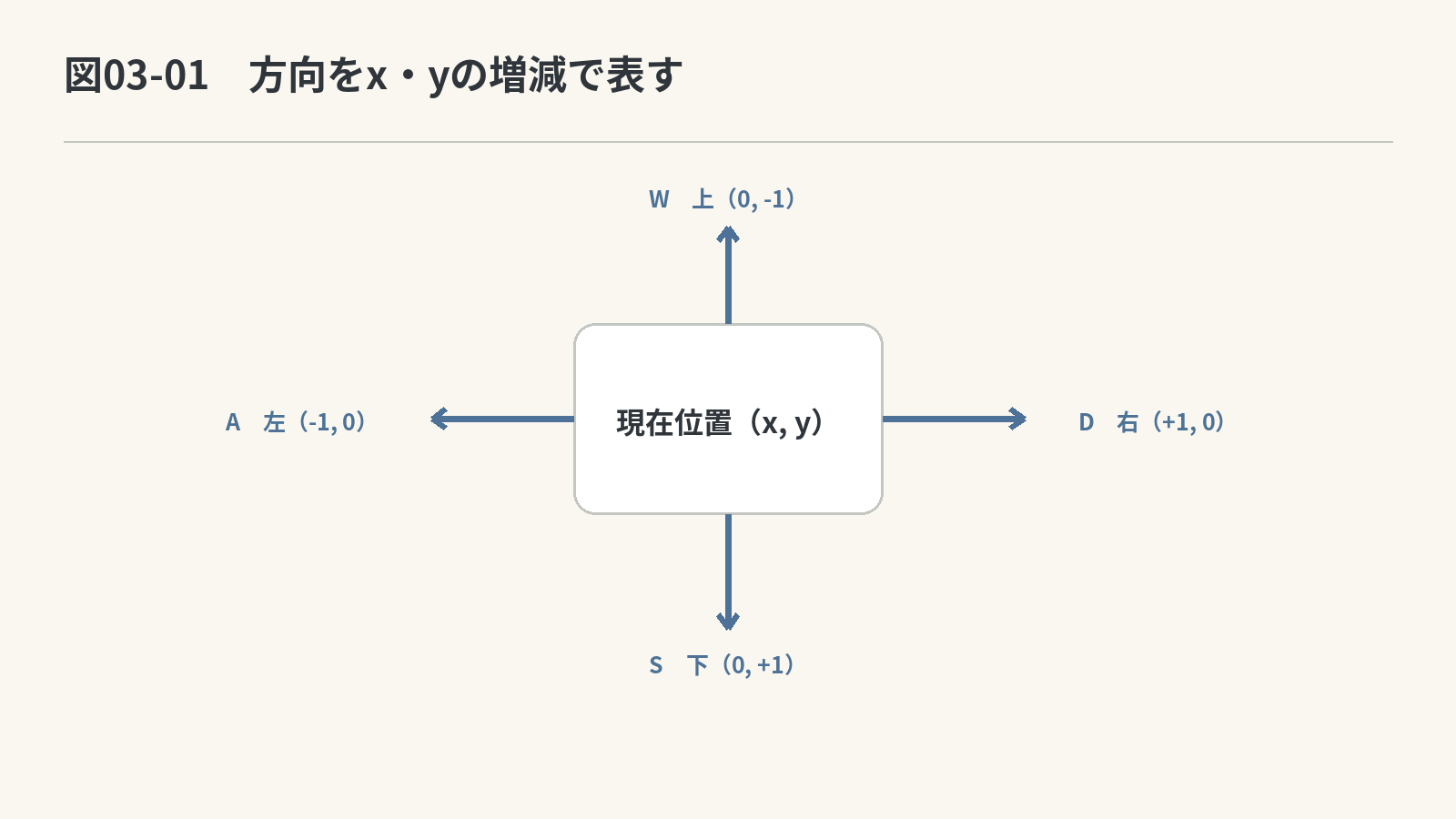
上下左右へ1マス動くとき、xとyは次のように変わります。
| 方向 | xの変化 | yの変化 |
|---|---|---|
| 上 | 0 | -1 |
| 左 | -1 | 0 |
| 下 | 0 | +1 |
| 右 | +1 | 0 |
| 入力なし | 0 | 0 |
この「どれだけ動くか」をPointで持ちます。
穴埋め DIR_VECTORを作ろう
enum Directionの下へ追加してください。
const Point DIR_VECTOR[] = {
    // 上方向:横位置は変えず、1行上へ進む
    { ____________________, ____________________ },

    // 左方向:1列左へ進み、縦位置は変えない
    { ____________________, ____________________ },

    // 下方向:横位置は変えず、1行下へ進む
    { ____________________, ____________________ },

    // 右方向:1列右へ進み、縦位置は変えない
    { ____________________, ____________________ },

    // 入力がないときは位置を変えない
    { ____________________, ____________________ }
};
ヒント
Mapでは右へ行くと
xが増え、下へ行くとyが増えます。上と左は反対方向です。
模範解答を見る
const Point DIR_VECTOR[] = {
    { 0, -1 },
    {-1,  0 },
    { 0, +1 },
    {+1,  0 },
    { 0,  0 }
};
Directionの並びとDIR_VECTORの並びを同じにしているので、
DIR_VECTOR[DIR_UP]
なら上方向の変化量を取り出せます。
3.WASDをDirectionへ変換しよう
前回作ったIsKeyPressed()は、そのまま使います。
今度は、キーが押されたら座標を直接変更するのではなく、まず「どの方向か」を返すGetDirection()を作ります。
先ほど宣言した関数の中身を作ります。
穴埋め GetDirection()を作ろう
DrawStageText()の下、GetPlayerPos()の前へ追加してください。
Direction GetDirection(void)
{
    // Wキーを押した瞬間か調べる
    int up = ________________________________;

    // Aキーを押した瞬間か調べる
    int left = ________________________________;

    // Sキーを押した瞬間か調べる
    int down = ________________________________;

    // Dキーを押した瞬間か調べる
    int right = ________________________________;

    if (up)
    {
        // Wキーが押されたので、上方向を表す値を返す
        return ____________________;
    }
    if (left)
    {
        // Aキーが押されたので、左方向を表す値を返す
        return ____________________;
    }
    if (down)
    {
        // Sキーが押されたので、下方向を表す値を返す
        return ____________________;
    }
    if (right)
    {
        // Dキーが押されたので、右方向を表す値を返す
        return ____________________;
    }

    // どの移動キーも押されていない
    return ____________________;
}
ヒント
キーの「押した瞬間」は前回の
IsKeyPressed()を使えます。戻り値は、押されたキーに対応するDirectionです。
模範解答を見る
Direction GetDirection(void)
{
    int up = IsKeyPressed(KEY_INPUT_W);
    int left = IsKeyPressed(KEY_INPUT_A);
    int down = IsKeyPressed(KEY_INPUT_S);
    int right = IsKeyPressed(KEY_INPUT_D);

    if (up)
    {
        return DIR_UP;
    }
    if (left)
    {
        return DIR_LEFT;
    }
    if (down)
    {
        return DIR_DOWN;
    }
    if (right)
    {
        return DIR_RIGHT;
    }

    return DIR_NONE;
}
4.現在位置+方向で移動先を作ろう
前回はWASDごとに別々の式を書きました。
今回は、
現在位置 + 方向の変化量 = 次の位置
という1つの式にします。
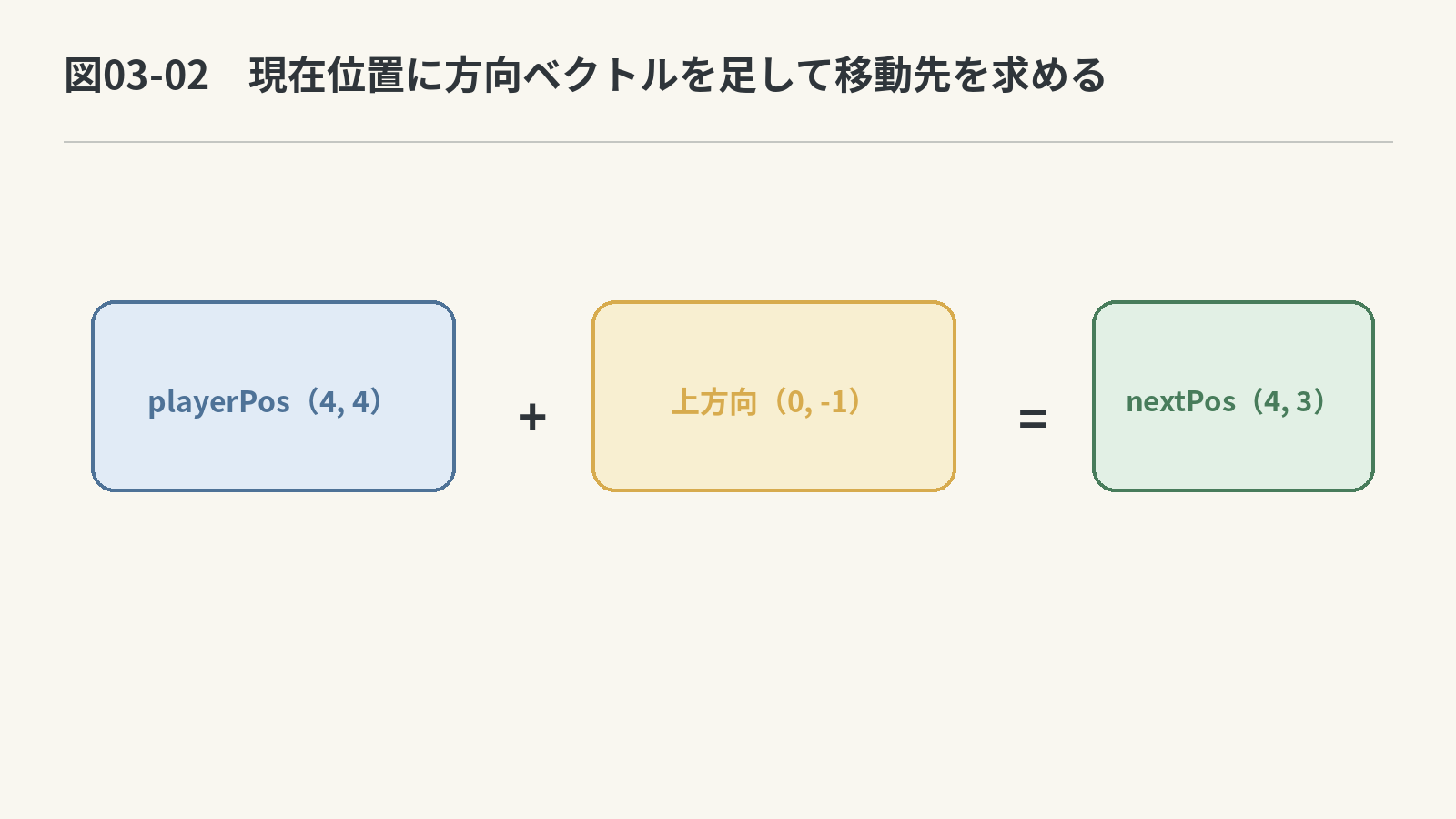
ゲームループにあったWASDの長いifを、次の処理へ置き換えてください。
穴埋め 方向から移動先を求めよう
// 今回押された移動方向を取得する
Direction dir = ________________________________;
if (dir != DIR_NONE)
{
Point playerPos = GetPlayerPos(¤tMap);
Point nextPos = {
// 現在のxへ、選んだ方向のx変化量を足す
________________________________,
// 現在のyへ、選んだ方向のy変化量を足す
________________________________
};
if (nextPos.x >= 0 && nextPos.x < currentMap.stage_width &&
nextPos.y >= 0 && nextPos.y < currentMap.stage_height)
{
// 移動先へコスコマンを置く
SetObjtoMap(____________________, nextPos, ¤tMap);
// 元の位置を床へ戻す
SetObjtoMap(____________________, playerPos, ¤tMap);
}
}
ヒント
dirはDIR_VECTORの添字としてそのまま使えます。現在位置のx/yへ、対応する変化量を足します。
模範解答を見る
Direction dir = GetDirection();
if (dir != DIR_NONE)
{
Point playerPos = GetPlayerPos(¤tMap);
Point nextPos = {
playerPos.x + DIR_VECTOR[dir].x,
playerPos.y + DIR_VECTOR[dir].y
};
if (nextPos.x >= 0 && nextPos.x < currentMap.stage_width &&
nextPos.y >= 0 && nextPos.y < currentMap.stage_height)
{
SetObjtoMap(HUMAN, nextPos, ¤tMap);
SetObjtoMap(FLOOR, playerPos, ¤tMap);
}
}
実行して確認
WASDで前回と同じように4方向へ動けば成功です。
結果は同じですが、移動先を作る式は、
playerPos + DIR_VECTOR[dir]
という考え方へまとめられました。
ただし、まだ壁や荷物を上書きできる問題は残っています。
📺 第4回の完成版を動画で確認
次回は、移動先に何があるかを先に調べてから動くようにします。
5.第4回の完成コード
第4回の完成コードを見る
#include "DxLib.h"
#define SCREEN_WIDTH 720
#define SCREEN_HEIGHT 600
#define MAX_STAGE_WIDTH 10
#define MAX_STAGE_HEIGHT 10
#define TEXT_SIZE 32
#define TEXT_STAGE_X 40
#define TEXT_STAGE_Y 90
enum OBJNAME
{
FLOOR = 0,
WALL = 1,
LUGG = 2,
GOAL = 3,
HUMAN = 4,
HUMAN_ON_GOAL = 5,
LUGG_ON_GOAL = 6,
OUTSIDE = 7
};
struct Point
{
int x;
int y;
};
struct Map
{
int stage_width;
int stage_height;
int Dat[MAX_STAGE_HEIGHT][MAX_STAGE_WIDTH];
};
const char OBJECT_CHAR[] = {
' ',
'#',
'$',
'.',
'@',
'+',
'*',
' '
};
enum Direction
{
DIR_UP,
DIR_LEFT,
DIR_DOWN,
DIR_RIGHT,
DIR_NONE
};
const Point DIR_VECTOR[] = {
{ 0, -1 },
{-1, 0 },
{ 0, +1 },
{+1, 0 },
{ 0, 0 }
};
const Map START_STAGE = {
10, 7,
{
{ 1, 1, 1, 1, 1, 1, 1, 1, 1, 1 },
{ 1, 0, 0, 0, 0, 0, 0, 0, 0, 1 },
{ 1, 0, 0, 0, 3, 0, 0, 0, 0, 1 },
{ 1, 0, 0, 0, 2, 0, 0, 0, 0, 1 },
{ 1, 0, 0, 0, 4, 0, 0, 0, 0, 1 },
{ 1, 0, 0, 0, 0, 0, 0, 0, 0, 1 },
{ 1, 1, 1, 1, 1, 1, 1, 1, 1, 1 }
}
};
void LoadStage(Map* map);
void DrawStageText(Map* map, int fontHandle);
Direction GetDirection(void);
Point GetPlayerPos(Map* map);
void SetObjtoMap(OBJNAME obj, Point pos, Map* map);
int IsKeyPressed(int key);
int WINAPI WinMain(HINSTANCE hInstance, HINSTANCE hPrevInstance, LPSTR lpCmdLine, int nCmdShow)
{
Map currentMap;
int fontHandle;
ChangeWindowMode(TRUE);
SetGraphMode(SCREEN_WIDTH, SCREEN_HEIGHT, 32);
SetMainWindowText("Costco Man");
if (DxLib_Init() != 0)
return -1;
SetDrawScreen(DX_SCREEN_BACK);
fontHandle = CreateFontToHandle("MS ゴシック", TEXT_SIZE, 1);
LoadStage(¤tMap);
while (ProcessMessage() == 0)
{
ClearDrawScreen();
Direction dir = GetDirection();
if (dir != DIR_NONE)
{
Point playerPos = GetPlayerPos(¤tMap);
Point nextPos = {
playerPos.x + DIR_VECTOR[dir].x,
playerPos.y + DIR_VECTOR[dir].y
};
if (nextPos.x >= 0 && nextPos.x < currentMap.stage_width &&
nextPos.y >= 0 && nextPos.y < currentMap.stage_height)
{
SetObjtoMap(HUMAN, nextPos, ¤tMap);
SetObjtoMap(FLOOR, playerPos, ¤tMap);
}
}
DrawString(24, 24, "COSTCO MAN", GetColor(255, 255, 255));
DrawStageText(¤tMap, fontHandle);
ScreenFlip();
}
DeleteFontToHandle(fontHandle);
DxLib_End();
return 0;
}
void LoadStage(Map* map)
{
map->stage_width = START_STAGE.stage_width;
map->stage_height = START_STAGE.stage_height;
for (int y = 0; y < map->stage_height; y++)
{
for (int x = 0; x < map->stage_width; x++)
{
map->Dat[y][x] = START_STAGE.Dat[y][x];
}
}
}
void DrawStageText(Map* map, int fontHandle)
{
char line[MAX_STAGE_WIDTH + 1];
for (int y = 0; y < map->stage_height; y++)
{
for (int x = 0; x < map->stage_width; x++)
{
int obj = map->Dat[y][x];
line[x] = OBJECT_CHAR[obj];
}
line[map->stage_width] = '\0';
DrawStringToHandle(
TEXT_STAGE_X,
TEXT_STAGE_Y + y * TEXT_SIZE,
line,
GetColor(255, 255, 255),
fontHandle);
}
}
Direction GetDirection(void)
{
// 4方向のキーが押された瞬間を調べる
int up = IsKeyPressed(KEY_INPUT_W);
int left = IsKeyPressed(KEY_INPUT_A);
int down = IsKeyPressed(KEY_INPUT_S);
int right = IsKeyPressed(KEY_INPUT_D);
if (up)
{
return DIR_UP;
}
if (left)
{
return DIR_LEFT;
}
if (down)
{
return DIR_DOWN;
}
if (right)
{
return DIR_RIGHT;
}
return DIR_NONE;
}
Point GetPlayerPos(Map* map)
{
Point result = { -1, -1 };
for (int y = 0; y < map->stage_height; y++)
{
for (int x = 0; x < map->stage_width; x++)
{
int obj = map->Dat[y][x];
if (obj == HUMAN)
{
result.x = x;
result.y = y;
return result;
}
}
}
return result;
}
void SetObjtoMap(OBJNAME obj, Point pos, Map* map)
{
map->Dat[pos.y][pos.x] = obj;
}
int IsKeyPressed(int key)
{
static int previous[256] = { 0 };
int current = CheckHitKey(key);
int pressed = 0;
if (current != 0 && previous[key] == 0)
{
pressed = 1;
}
previous[key] = current;
return pressed;
}
第4回の変更点入り完成コードを見る
このコードは、上の説明なし完成コードと同じ処理です。今回追加・変更した場所を中心に、役割や理由もコメントで確認できます。
- 入力キーをDirectionへ変換し、入力と移動処理を分ける考え方
- x・yの変化量を移動ベクトルとしてDIR_VECTORへまとめる方法
- 4方向に分かれていた移動先計算を同じ式へまとめる流れ
#include "DxLib.h"
#define SCREEN_WIDTH 720
#define SCREEN_HEIGHT 600
#define MAX_STAGE_WIDTH 10
#define MAX_STAGE_HEIGHT 10
#define TEXT_SIZE 32
#define TEXT_STAGE_X 40
#define TEXT_STAGE_Y 90
enum OBJNAME
{
FLOOR = 0,
WALL = 1,
LUGG = 2,
GOAL = 3,
HUMAN = 4,
HUMAN_ON_GOAL = 5,
LUGG_ON_GOAL = 6,
OUTSIDE = 7
};
struct Point
{
int x;
int y;
};
struct Map
{
int stage_width;
int stage_height;
int Dat[MAX_STAGE_HEIGHT][MAX_STAGE_WIDTH];
};
const char OBJECT_CHAR[] = {
' ',
'#',
'$',
'.',
'@',
'+',
'*',
' '
};
// 【解説・今回追加】W・A・S・Dというキーではなく、上下左右という移動方向に名前を付ける。
enum Direction
{
DIR_UP,
DIR_LEFT,
DIR_DOWN,
DIR_RIGHT,
DIR_NONE
};
// 【解説・今回追加】方向ごとのx・yの変化量を、移動ベクトルとしてPointにまとめる。
// 【解説・理由】Directionの値をそのまま添字にすると、対応する変化量を取り出せる。
const Point DIR_VECTOR[] = {
{ 0, -1 },
{-1, 0 },
{ 0, +1 },
{+1, 0 },
{ 0, 0 }
};
const Map START_STAGE = {
10, 7,
{
{ 1, 1, 1, 1, 1, 1, 1, 1, 1, 1 },
{ 1, 0, 0, 0, 0, 0, 0, 0, 0, 1 },
{ 1, 0, 0, 0, 3, 0, 0, 0, 0, 1 },
{ 1, 0, 0, 0, 2, 0, 0, 0, 0, 1 },
{ 1, 0, 0, 0, 4, 0, 0, 0, 0, 1 },
{ 1, 0, 0, 0, 0, 0, 0, 0, 0, 1 },
{ 1, 1, 1, 1, 1, 1, 1, 1, 1, 1 }
}
};
void LoadStage(Map* map);
void DrawStageText(Map* map, int fontHandle);
// 【解説・今回追加】入力キーをDirectionへ変換し、入力の調査と移動計算を分ける。
Direction GetDirection(void);
Point GetPlayerPos(Map* map);
void SetObjtoMap(OBJNAME obj, Point pos, Map* map);
int IsKeyPressed(int key);
int WINAPI WinMain(HINSTANCE hInstance, HINSTANCE hPrevInstance, LPSTR lpCmdLine, int nCmdShow)
{
Map currentMap;
int fontHandle;
ChangeWindowMode(TRUE);
SetGraphMode(SCREEN_WIDTH, SCREEN_HEIGHT, 32);
SetMainWindowText("Costco Man");
if (DxLib_Init() != 0)
return -1;
SetDrawScreen(DX_SCREEN_BACK);
fontHandle = CreateFontToHandle("MS ゴシック", TEXT_SIZE, 1);
LoadStage(¤tMap);
while (ProcessMessage() == 0)
{
ClearDrawScreen();
// 【解説・流れ】このフレームの入力を、最初に1つのDirectionへまとめる。
Direction dir = GetDirection();
// 【解説・判定】方向入力がないフレームでは、位置の探索もMapの書き換えも行わない。
if (dir != DIR_NONE)
{
Point playerPos = GetPlayerPos(¤tMap);
// 【解説・今回変更】4方向別の式をやめ、現在位置へDIR_VECTORのx・yを足す同じ式へまとめる。
Point nextPos = {
playerPos.x + DIR_VECTOR[dir].x,
playerPos.y + DIR_VECTOR[dir].y
};
if (nextPos.x >= 0 && nextPos.x < currentMap.stage_width &&
nextPos.y >= 0 && nextPos.y < currentMap.stage_height)
{
SetObjtoMap(HUMAN, nextPos, ¤tMap);
SetObjtoMap(FLOOR, playerPos, ¤tMap);
}
}
DrawString(24, 24, "COSTCO MAN", GetColor(255, 255, 255));
DrawStageText(¤tMap, fontHandle);
ScreenFlip();
}
DeleteFontToHandle(fontHandle);
DxLib_End();
return 0;
}
void LoadStage(Map* map)
{
map->stage_width = START_STAGE.stage_width;
map->stage_height = START_STAGE.stage_height;
for (int y = 0; y < map->stage_height; y++)
{
for (int x = 0; x < map->stage_width; x++)
{
map->Dat[y][x] = START_STAGE.Dat[y][x];
}
}
}
void DrawStageText(Map* map, int fontHandle)
{
char line[MAX_STAGE_WIDTH + 1];
for (int y = 0; y < map->stage_height; y++)
{
for (int x = 0; x < map->stage_width; x++)
{
int obj = map->Dat[y][x];
line[x] = OBJECT_CHAR[obj];
}
line[map->stage_width] = '\0';
DrawStringToHandle(
TEXT_STAGE_X,
TEXT_STAGE_Y + y * TEXT_SIZE,
line,
GetColor(255, 255, 255),
fontHandle);
}
}
// 【解説・役割】押されたキーに対応するDirectionを返す。どれも押されていなければDIR_NONEを返す。
Direction GetDirection(void)
{
// 4方向のキーが押された瞬間を調べる
int up = IsKeyPressed(KEY_INPUT_W);
int left = IsKeyPressed(KEY_INPUT_A);
int down = IsKeyPressed(KEY_INPUT_S);
int right = IsKeyPressed(KEY_INPUT_D);
if (up)
{
return DIR_UP;
}
if (left)
{
return DIR_LEFT;
}
if (down)
{
return DIR_DOWN;
}
if (right)
{
return DIR_RIGHT;
}
// 【解説・理由】入力なしもDirectionの1種類にして、呼び出し側の扱いを統一する。
return DIR_NONE;
}
Point GetPlayerPos(Map* map)
{
Point result = { -1, -1 };
for (int y = 0; y < map->stage_height; y++)
{
for (int x = 0; x < map->stage_width; x++)
{
int obj = map->Dat[y][x];
if (obj == HUMAN)
{
result.x = x;
result.y = y;
return result;
}
}
}
return result;
}
void SetObjtoMap(OBJNAME obj, Point pos, Map* map)
{
map->Dat[pos.y][pos.x] = obj;
}
int IsKeyPressed(int key)
{
static int previous[256] = { 0 };
int current = CheckHitKey(key);
int pressed = 0;
if (current != 0 && previous[key] == 0)
{
pressed = 1;
}
previous[key] = current;
return pressed;
}
No Comments