
第8回 文字を画像へ置き換えよう
第8回 文字を画像へ置き換えよう
第1部では、文字だけでコスコマンを最後まで遊べるところまで作りました。
ここからの第2部では、ゲームのルールはそのまま使い、見た目・動き・音・画面遷移を追加してゲームらしく仕上げていきます。
第1部で完成したもの

Map
移動
壁・ゴール判定
荷物押し
クリア判定
複数ステージ
リトライ
        ↓
ゲームのルールはそのまま使う
        ↓
画像・動き・音・画面遷移を追加
表示方法が変わっても、ゲームのルールまで全部作り直す必要はありません。
第8回では、まず@や$で描いていたステージを画像へ置き換えます。
文字版では、Mapの数字をOBJECT_CHARへ変換してステージを表示しました。
Mapの値 → 文字
今回は、同じMapを、
Mapの値 → 画像
へ変えます。
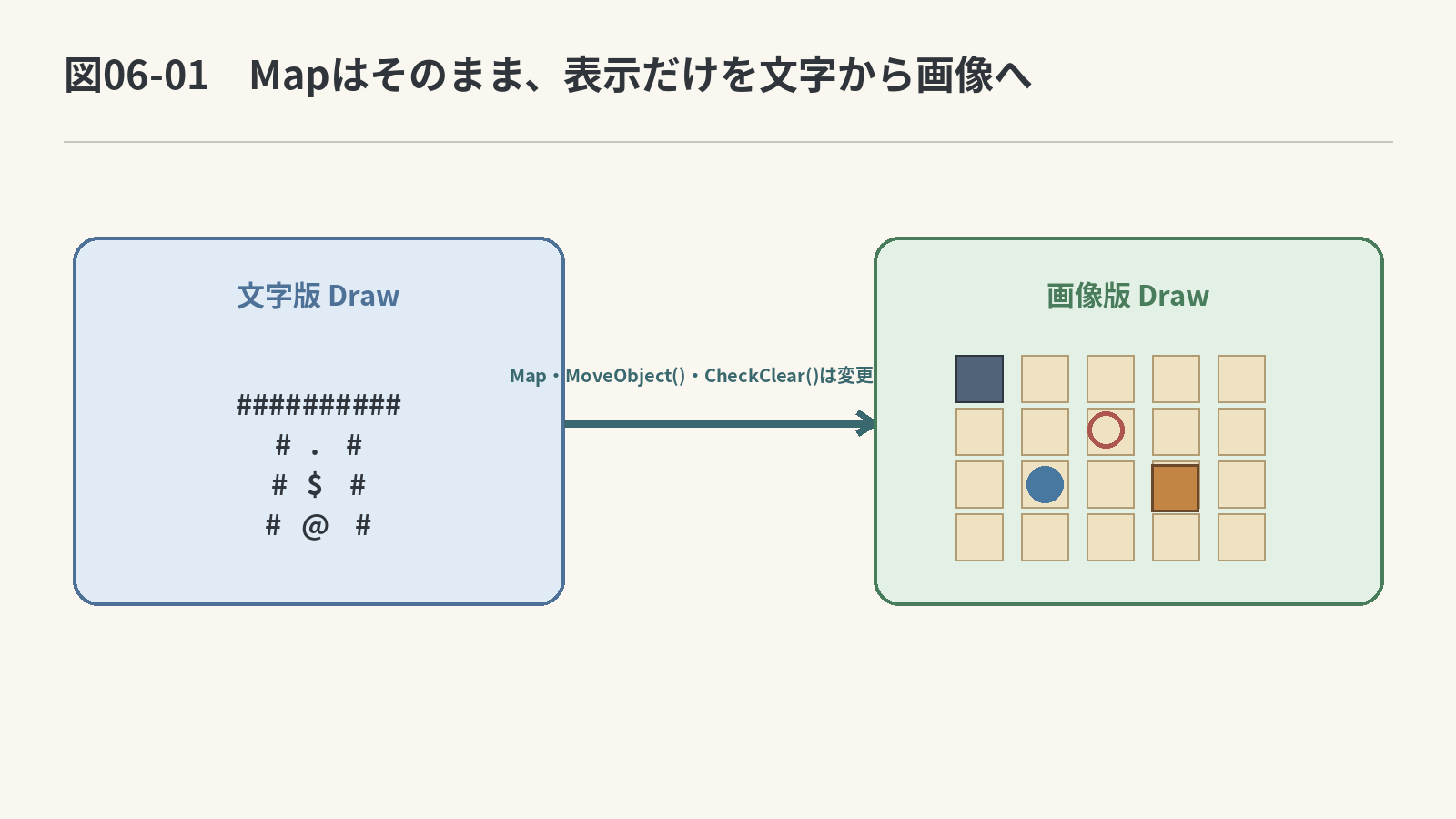
第1部で作った、
- プレイヤー位置を探す
- 移動先を調べる
- 壁で止める
- 荷物を押す
- クリアを調べる
という処理は、そのまま使います。
今回の流れ
ゲーム開始時に画像を読み込む
        ↓
ゲームの更新処理はそのまま使う
        ↓
床・壁・ゴールなど、動かないものを描く
        ↓
荷物・コスコマンなど、動くものをあとから重ねて描く
        ↓
終了時に画像を解放する
1.画像で1マスを描く準備をしよう
文字版では1マスを1文字で表示しました。
画像版では、1マスを64×64ピクセルの画像で表示します。
DIR_VECTORの下、STAGESの前へ次を追加してください。
#define TILE_SIZE 64
#define STAGE_X 40
#define STAGE_Y 90
TILE_SIZE:1マスの大きさSTAGE_X:ステージ左端のX座標STAGE_Y:ステージ上端のY座標
文字表示で使っていた、
#define TEXT_SIZE 32
#define TEXT_STAGE_X 40
#define TEXT_STAGE_Y 90
とOBJECT_CHAR[]は、もう使わないので削除します。
2.画像ハンドルを1つにまとめよう
今回は、次の5枚の画像を使います。すべて64×64ピクセルのPNG画像です。
| プレビュー | ファイル名 | ゲーム内で使う場所 |
|---|---|---|
 |
floor.png |
床 |
 |
goal.png |
ゴール |
 |
wall.png |
壁 |
 |
luggage.png |
荷物 |
 |
human.png |
コスコマン |
上の「画像素材5枚をまとめてダウンロード」を押してZIPを保存し、展開してください。1枚ずつ保存する場合は、表の画像を右クリックして、表にあるファイル名で保存します。
5枚は、C++のソースファイルがあるプロジェクトフォルダーのimagesへ置きます。
プロジェクトフォルダー
├─ main.cpp
└─ images
   ├─ floor.png
   ├─ goal.png
   ├─ wall.png
   ├─ luggage.png
   └─ human.png
ファイル名やフォルダー名を変えると、後で書くLoadGraph("images/floor.png")などのパスと一致しなくなります。この名前と場所のまま保存してください。
画像ハンドルを別々の変数に散らさず、GameImages構造体へまとめます。
TILE_SIZE、STAGE_X、STAGE_Yの定義に続けて、画像ハンドルをまとめる構造体を置きます。
struct GameImages
{
    int floor;
    int wall;
    int goal;
    int luggage;
    int human;
};
変数として使うときは、これまでのMapやPointと同じように、
GameImages images;
と書きます。
画像処理で使う関数
第8回では、画像の読み込み・解放・ステージ描画を別々の関数にします。
3つのプロトタイプ宣言は、CheckClear()の宣言とUpdateGame()の宣言の間へ追加します。前後の宣言を消さず、次の並びにしてください。
MoveResult MoveObject(Direction dir, Map* map);
int CheckClear(Map* map);

// 第8回で追加する3つの宣言
void LoadGameImages(GameImages* images);
void DeleteGameImages(GameImages* images);
void DrawStageImage(Map* map, GameImages* images);

void UpdateGame(Map* map, int* currentStage, int* clearFlag);
void DrawGame(Map* map, int currentStage, int clearFlag, GameImages* images);
| 関数 | 担当する処理 | 呼び出す場所 |
|---|---|---|
LoadGameImages() |
使う画像を読み込む | DxLibの初期化が終わったあとに1回 |
DrawStageImage() |
Mapを画像で描く | ゲームループの描画中に毎フレーム |
DeleteGameImages() |
読み込んだ画像を解放する | ゲームループを抜けたあとに1回 |
3.画像を読み込もう
LoadGameImages()の関数本体は、CheckClear()の定義が終わった直後へ置きます。5枚の画像を読み込む処理になるよう、空欄を埋めてください。
void LoadGameImages(GameImages* images)
{
    // 床画像を読み込んで床用ハンドルへ保存する
    images->floor = ________________________________;

    // 壁画像を読み込んで壁用ハンドルへ保存する
    images->wall = ________________________________;

    // ゴール画像を読み込んでゴール用ハンドルへ保存する
    images->goal = ________________________________;

    // 荷物画像を読み込んで荷物用ハンドルへ保存する
    images->luggage = ________________________________;

    // コスコマン画像を読み込んで人用ハンドルへ保存する
    images->human = ________________________________;
}
完成条件
- 5枚の画像を
LoadGraph()で1回ずつ読み込む - 返された画像ハンドルを、対応する
GameImagesのメンバへ保存する - 読み込み時と同じ5個のハンドルを
DeleteGraph()で解放する
ヒント
DxLibで画像を読み込む関数を使います。ファイルは
images/の中にあります。
模範解答を見る
void LoadGameImages(GameImages* images)
{
    images->floor = LoadGraph("images/floor.png");
    images->wall = LoadGraph("images/wall.png");
    images->goal = LoadGraph("images/goal.png");
    images->luggage = LoadGraph("images/luggage.png");
    images->human = LoadGraph("images/human.png");
}
LoadGameImages()の下へ、削除側も作ります。
void DeleteGameImages(GameImages* images)
{
    // 読み込んだ床画像を解放する
    ________________________________;

    // 読み込んだ壁画像を解放する
    ________________________________;

    // 読み込んだゴール画像を解放する
    ________________________________;

    // 読み込んだ荷物画像を解放する
    ________________________________;

    // 読み込んだコスコマン画像を解放する
    ________________________________;
}
模範解答を見る
void DeleteGameImages(GameImages* images)
{
    DeleteGraph(images->floor);
    DeleteGraph(images->wall);
    DeleteGraph(images->goal);
    DeleteGraph(images->luggage);
    DeleteGraph(images->human);
}
4.動かないものを先に、動くものをあとから描こう
文字では、
* = ゴールの上に荷物
+ = ゴールの上にコスコマン
のように、1文字で「重なっている状態」を表していました。
画像では、あとから描いた画像が前に表示されます。
そこで今回は、
先に描く
床・壁・ゴールなどの動かないもの
        ↓
あとから描く
荷物・コスコマンなどの動くもの
という順番で描きます。
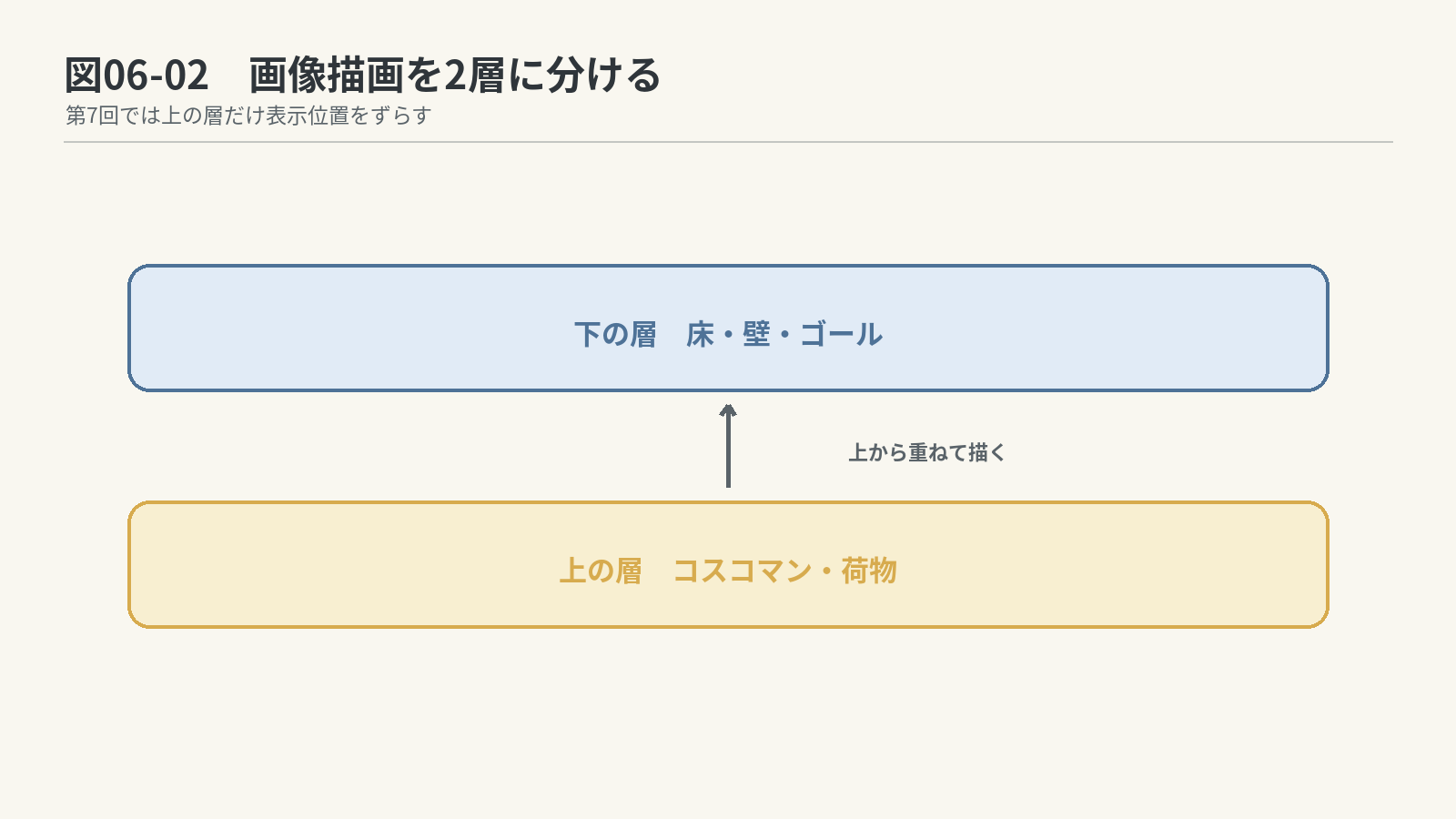
たとえばゴールの上に荷物がある場合は、
ゴールを描く
        ↓
同じ場所へ荷物を描く
        ↓
ゴールの上に荷物が見える
となります。
DrawStageImage()の流れを先に見よう
いきなりコードを書く前に、DrawStageImage()が何をする関数なのかを見ておきましょう。
DrawStageImage()

    Map全体を順番に見る
            ↓
    動かないものを描く

            ↓

    Map全体をもう一度順番に見る
            ↓
    動くものをあとから描く
Map全体を見るときは、これまでと同じように二重forを使います。
まだ中身は書かず、まずは形だけ見ると次のようになります。
void DrawStageImage(Map* map, GameImages* images)
{
    // ① 動かないものを描く
    for (int y = 0; y < map->stage_height; y++)
    {
        for (int x = 0; x < map->stage_width; x++)
        {
            // このマスの描画処理
        }
    }

    // ② 動くものをあとから描く
    for (int y = 0; y < map->stage_height; y++)
    {
        for (int x = 0; x < map->stage_width; x++)
        {
            // このマスの描画処理
        }
    }
}
どちらの二重forも、Mapの左上から1マスずつ順番に見ていく処理です。
では、1マス分の画像を画面のどこへ描けばよいかを先に考えてみましょう。
Mapのマス番号を画面座標へ変えよう
ステージは、画面の
(STAGE_X, STAGE_Y) = (40, 90)
から描き始めます。
画像1枚の大きさは、
TILE_SIZE = 64
なので、1マスは64×64ピクセルです。
画面の左上 (0, 0)
    ┌────────────────────────→ X
    │
    │     ステージの左上 (40, 90)
    │             ┌──────┬──────┬──────
    │             │(0,0) │(1,0) │(2,0)
    │             ├──────┼──────┼──────
    │             │(0,1) │(1,1) │(2,1)
    │             └──────┴──────┴──────
    ↓ Y            1マスは64×64ピクセル
開始位置が(40, 90)で、そこから64×64ピクセルずつ画像を並べていくと考えると、Mapの(x, y)は画面のどこになるでしょうか。
まず言葉で考えると、
画像を置くX座標
= ステージ左端のX座標 + 横に進んだマス数 × 1マスの幅

画像を置くY座標
= ステージ上端のY座標 + 縦に進んだマス数 × 1マスの高さ
となります。
これを、プログラムで使っている名前へ置き換えてみましょう。
int drawX = ________________________________;
int drawY = ________________________________;
ヒント
開始位置
    X方向 → STAGE_X
    Y方向 → STAGE_Y

何マス進んだか
    横方向 → x
    縦方向 → y

1マスの大きさ
    TILE_SIZE
もう少しヒントを見ると、
drawX = STAGE_X + ○○ * TILE_SIZE
drawY = STAGE_Y + ○○ * TILE_SIZE
です。
模範解答を見る
int drawX = STAGE_X + x * TILE_SIZE;
int drawY = STAGE_Y + y * TILE_SIZE;
式ができたら、実際の位置も確認してみましょう。
Mapのマス (x, y) |
drawXの計算 |
drawYの計算 |
画像の左上位置 |
|---|---|---|---|
(0, 0) |
40 + 0 × 64 |
90 + 0 × 64 |
(40, 90) |
(1, 0) |
40 + 1 × 64 |
90 + 0 × 64 |
(104, 90) |
(0, 1) |
40 + 0 × 64 |
90 + 1 × 64 |
(40, 154) |
(2, 3) |
40 + 2 × 64 |
90 + 3 × 64 |
(168, 282) |
このdrawXとdrawYをDrawGraph()へ渡せば、そのマスへ画像を1枚描けます。
DrawGraph(drawX, drawY, images->floor, TRUE);
つまり、二重forの中では、
1マス見る
        ↓
x、yからdrawX、drawYを計算する
        ↓
そのマスのMapの値を見る
        ↓
必要な画像を描く
という処理を繰り返します。
Mapの値を読むときは順番に注意
座標は(x, y)の順で考えますが、二次元配列の値を読むときは、
map->Dat[y][x]
です。
y → 上から何行目か
x → その行の左から何列目か
の順で選ぶためです。
1回目:動かないものを描こう
まず、Map全体を見ながら、床・壁・ゴールなどの動かないものを描きます。
DrawStageImage()の関数本体は、DeleteGameImages()の定義の直後へ置きます。
void DrawStageImage(Map* map, GameImages* images)
{
    // ① 動かないものを描く
    for (int y = 0; y < map->stage_height; y++)
    {
        for (int x = 0; x < map->stage_width; x++)
        {
            int obj = map->Dat[y][x];

            // 先ほど考えた式を使って、画面上の座標を求める
            int drawX = ________________________________;
            int drawY = ________________________________;

            if (obj == WALL)
            {
                // 壁マスには壁画像を描く
                ________________________________;
            }
            else if (obj == GOAL || obj == HUMAN_ON_GOAL || obj == LUGG_ON_GOAL)
            {
                // ゴール、またはゴール上に何かあるマスにはゴール画像を描く
                ________________________________;
            }
            else
            {
                // それ以外のマスには床画像を描く
                ________________________________;
            }
        }
    }
ヒント
drawXとdrawYには、先ほど作った座標変換の式を使います。- 画像は
DrawGraph()で描きます。 - 画像ハンドルは
images->wall、images->goal、images->floorです。
模範解答を見る
int drawX = STAGE_X + x * TILE_SIZE;
int drawY = STAGE_Y + y * TILE_SIZE;

if (obj == WALL)
{
    DrawGraph(drawX, drawY, images->wall, TRUE);
}
else if (obj == GOAL || obj == HUMAN_ON_GOAL || obj == LUGG_ON_GOAL)
{
    DrawGraph(drawX, drawY, images->goal, TRUE);
}
else
{
    DrawGraph(drawX, drawY, images->floor, TRUE);
}
2回目:動くものをあとから描こう
次は、同じMapをもう一度見ながら、荷物とコスコマンをあとから重ねて描きます。
1回目の二重forが終わったあとへ、次の処理を追加します。
    // ② 動くものをあとから描く
    for (int y = 0; y < map->stage_height; y++)
    {
        for (int x = 0; x < map->stage_width; x++)
        {
            int obj = map->Dat[y][x];
            int drawX = STAGE_X + x * TILE_SIZE;
            int drawY = STAGE_Y + y * TILE_SIZE;

            if (obj == HUMAN || obj == HUMAN_ON_GOAL)
            {
                // コスコマンをあとから重ねて描く
                ________________________________;
            }
            else if (obj == LUGG || obj == LUGG_ON_GOAL)
            {
                // 荷物をあとから重ねて描く
                ________________________________;
            }
        }
    }
}
ヒント
- コスコマンの画像ハンドルは
images->human - 荷物の画像ハンドルは
images->luggage - 1回目と同じ
drawX、drawYへ描けば、同じマスへ画像を重ねられます。
模範解答を見る
if (obj == HUMAN || obj == HUMAN_ON_GOAL)
{
    DrawGraph(drawX, drawY, images->human, TRUE);
}
else if (obj == LUGG || obj == LUGG_ON_GOAL)
{
    DrawGraph(drawX, drawY, images->luggage, TRUE);
}
これで、動かないものを先に描き、その上から動くものを重ねて描けるようになりました。
5.作った画像処理をゲームへ組み込もう
ここまでで、
LoadGameImages():画像を読み込むDrawStageImage():Mapを画像で描くDeleteGameImages():画像を解放する
を作りました。
あとは、この3つをゲームの流れへ組み込みます。
DxLibを初期化する
        ↓
LoadGameImages()で画像を読み込む
        ↓
ゲームループ
    DrawGame()
        ↓
    DrawStageImage()で画像を描く
        ↓
ゲームループを抜ける
        ↓
DeleteGameImages()で画像を解放する
        ↓
DxLibを終了する
WinMainで使おう
WinMain()全体ではなく、画像に関係する部分だけを見ると次の形になります。
int WINAPI WinMain(...)
{
// これまでの変数
...
// 画像ハンドル一式をまとめて持つ
GameImages images;
// DxLibの初期化
...
// 画像を1回だけ読み込む
LoadGameImages(&images);
// その他の準備
...
while (...)
{
// 更新処理
...
// 画像ハンドル一式を描画処理へ渡す
DrawGame(¤tMap, currentStage, clearFlag, &images);
...
}
// 読み込んだ画像を解放する
DeleteGameImages(&images);
// DxLibの終了処理
...
}
LoadGraph()はDxLibの機能なので、画像はDxLib_Init()が成功したあとに読み込みます。
また、画像の解放にはDxLibの機能を使うため、DeleteGameImages()はDxLib_End()より前に呼び出します。
なぜimagesの前に&を付けるのか
LoadGameImages()やDeleteGameImages()では、WinMain()で作った同じimagesを使いたいので、コピーではなくアドレスを渡します。
LoadGameImages(&images);
DrawGame(¤tMap, currentStage, clearFlag, &images);
DeleteGameImages(&images);
&imagesと書くと、imagesのメモリ上のアドレスを渡せます。
これによって、読み込んだ画像ハンドルを同じimagesへ保存し、そのまま描画や解放でも使えます。
DrawGameを画像版へ切り替えよう
DrawGame()には、画像を1枚だけ渡すのではありません。
ゲームで使う画像ハンドル一式をまとめたGameImages構造体へのポインタを受け取れるように、最後の引数を追加します。
void DrawGame(Map* map, int currentStage, int clearFlag, GameImages* images);
そして、文字版で使っていたDrawStageText()をDrawStageImage()へ置き換えます。
void DrawGame(Map* map, int currentStage, int clearFlag, GameImages* images)
{
    DrawFormatString(24, 20, GetColor(255, 255, 255),
        "STAGE %d / %d", currentStage + 1, STAGE_COUNT);

    DrawString(300, 20, "WASD : MOVE    R : RETRY", GetColor(200, 200, 200));

    // GameImagesにまとめた画像ハンドル一式を使ってMapを描く
    DrawStageImage(map, images);

    if (clearFlag)
    {
        DrawString(250, 540, "CLEAR!", GetColor(255, 220, 80));
        DrawString(355, 540, "ENTER : NEXT", GetColor(255, 255, 255));
    }
}
DrawGame()が受け取ったimagesは、すでにGameImages*型です。DrawStageImage()へ渡すときは、&を追加せずそのまま渡します。
ステージ番号、操作説明、クリア表示は引き続き文字で表示するので、DrawFormatString()とDrawString()は残します。
文字ステージ専用の処理を外す
文字でステージを描くためだけに使っていた次の処理は不要になります。
int fontHandle;CreateFontToHandle()の呼び出しDeleteFontToHandle()の呼び出しDrawStageText()のプロトタイプ宣言DrawStageText()の関数本体
削除するのは、文字でステージを描くための処理だけです。
ステージ番号や操作説明を表示するDrawFormatString()とDrawString()まで削除しないようにします。
6.実行して、ゲームの中身が変わっていないことを確認しよう
実行してみましょう。
表示は文字から画像に変わりますが、次は第7回までと同じはずです。
- WASDで移動できる
- 壁では止まる
- 荷物を押せる
- ゴールの上ではゴール画像が下に残る
- クリアできる
- Rでリトライできる
- ENTERで次のステージへ進める
ここが重要です。
表示方法を変えても、ゲームルールを扱う関数は作り直していません。
文字版で作ったゲームの仕組みと、画面にどう見せるかは別の仕事として扱えるようになっています。
次回は、Map上では1マスずつ動くコスコマンを、画面上では滑らかに動かします。
おまけ:構造体を関数へ渡すとき
構造体を関数へ渡すときは、コピーして渡す方法と、元の構造体そのものを使うためにアドレスを渡す方法があります。
コピーして渡す
    ↓
関数の中では、コピーされた別の値を使う

アドレスを渡す
    ↓
元の構造体そのものを使う
たとえば、小さな構造体の値を関数の中で読むだけで、元の構造体を書き換える必要がない場合は、コピーして渡してもかまいません。
一方、今回のGameImagesでは、
- 読み込んだ画像ハンドルを同じ
imagesへ保存する - その
imagesを描画でも使う - 最後に同じ
imagesを使って画像を解放する
という使い方をしています。
そのため、コピーではなくアドレスを渡しています。
LoadGameImages(&images);
DrawGame(¤tMap, currentStage, clearFlag, &images);
DeleteGameImages(&images);
ゲームプログラムでは、Mapやキャラクターの状態、画像ハンドルのまとまりなど、同じデータをいろいろな処理から使いたいことがよくあります。
そのため、構造体のアドレスを関数へ渡す書き方もよく使います。
7.第8回の完成コード
第8回の完成コードを見る
#include "DxLib.h"
#define SCREEN_WIDTH 720
#define SCREEN_HEIGHT 600
#define MAX_STAGE_WIDTH 10
#define MAX_STAGE_HEIGHT 10
#define STAGE_COUNT 3
enum OBJNAME
{
FLOOR = 0,
WALL = 1,
LUGG = 2,
GOAL = 3,
HUMAN = 4,
HUMAN_ON_GOAL = 5,
LUGG_ON_GOAL = 6,
OUTSIDE = 7
};
struct Point
{
int x;
int y;
};
struct Map
{
int stage_width;
int stage_height;
int Dat[MAX_STAGE_HEIGHT][MAX_STAGE_WIDTH];
};
enum Direction
{
DIR_UP,
DIR_LEFT,
DIR_DOWN,
DIR_RIGHT,
DIR_NONE
};
enum MoveResult
{
MOVE_NONE,
MOVE_WALK,
MOVE_PUSH,
MOVE_PUSH_GOAL
};
const Point DIR_VECTOR[] = {
{ 0, -1 },
{-1, 0 },
{ 0, +1 },
{+1, 0 },
{ 0, 0 }
};
#define TILE_SIZE 64
#define STAGE_X 40
#define STAGE_Y 90
struct GameImages
{
int floor;
int wall;
int goal;
int luggage;
int human;
};
const Map STAGES[STAGE_COUNT] = {
{
10, 7,
{
{ 1, 1, 1, 1, 1, 1, 1, 1, 1, 1 },
{ 1, 0, 0, 0, 0, 0, 0, 0, 0, 1 },
{ 1, 0, 0, 0, 3, 0, 0, 0, 0, 1 },
{ 1, 0, 0, 0, 2, 0, 0, 0, 0, 1 },
{ 1, 0, 0, 0, 4, 0, 0, 0, 0, 1 },
{ 1, 0, 0, 0, 0, 0, 0, 0, 0, 1 },
{ 1, 1, 1, 1, 1, 1, 1, 1, 1, 1 }
}
},
{
10, 7,
{
{ 1, 1, 1, 1, 1, 1, 1, 1, 1, 1 },
{ 1, 0, 0, 0, 1, 0, 0, 0, 0, 1 },
{ 1, 0, 2, 0, 1, 0, 3, 0, 0, 1 },
{ 1, 0, 0, 2, 0, 0, 3, 0, 0, 1 },
{ 1, 0, 0, 0, 1, 1, 0, 0, 0, 1 },
{ 1, 0, 4, 0, 0, 0, 0, 0, 0, 1 },
{ 1, 1, 1, 1, 1, 1, 1, 1, 1, 1 }
}
},
{
10, 7,
{
{ 1, 1, 1, 1, 1, 1, 1, 1, 1, 1 },
{ 1, 1, 1, 1, 0, 0, 1, 0, 4, 1 },
{ 1, 1, 1, 0, 0, 0, 1, 0, 0, 1 },
{ 1, 1, 1, 2, 0, 2, 0, 2, 0, 1 },
{ 1, 1, 1, 0, 2, 2, 1, 0, 0, 1 },
{ 1, 3, 3, 3, 3, 3, 0, 0, 1, 1 },
{ 1, 1, 1, 1, 1, 1, 1, 1, 1, 1 }
}
}
};
void LoadStage(Map* map, int stageNumber);
Direction GetDirection(void);
Point GetPlayerPos(Map* map);
OBJNAME GetObjectNum(Point pos, Map* map);
void SetObjtoMap(OBJNAME obj, Point pos, Map* map);
int IsKeyPressed(int key);
MoveResult MoveObject(Direction dir, Map* map);
int CheckClear(Map* map);
void LoadGameImages(GameImages* images);
void DeleteGameImages(GameImages* images);
void DrawStageImage(Map* map, GameImages* images);
void UpdateGame(Map* map, int* currentStage, int* clearFlag);
void DrawGame(Map* map, int currentStage, int clearFlag, GameImages* images);
int WINAPI WinMain(HINSTANCE hInstance, HINSTANCE hPrevInstance, LPSTR lpCmdLine, int nCmdShow)
{
Map currentMap;
GameImages images;
int currentStage = 0;
int clearFlag = 0;
ChangeWindowMode(TRUE);
SetGraphMode(SCREEN_WIDTH, SCREEN_HEIGHT, 32);
SetMainWindowText("Costco Man");
if (DxLib_Init() != 0)
return -1;
SetDrawScreen(DX_SCREEN_BACK);
LoadGameImages(&images);
LoadStage(¤tMap, currentStage);
while (ProcessMessage() == 0)
{
ClearDrawScreen();
UpdateGame(¤tMap, ¤tStage, &clearFlag);
DrawGame(¤tMap, currentStage, clearFlag, &images);
ScreenFlip();
}
DeleteGameImages(&images);
DxLib_End();
return 0;
}
void LoadStage(Map* map, int stageNumber)
{
map->stage_width = STAGES[stageNumber].stage_width;
map->stage_height = STAGES[stageNumber].stage_height;
for (int y = 0; y < map->stage_height; y++)
{
for (int x = 0; x < map->stage_width; x++)
{
map->Dat[y][x] = STAGES[stageNumber].Dat[y][x];
}
}
}
Direction GetDirection(void)
{
// 4方向のキーが押された瞬間を調べる
int up = IsKeyPressed(KEY_INPUT_W);
int left = IsKeyPressed(KEY_INPUT_A);
int down = IsKeyPressed(KEY_INPUT_S);
int right = IsKeyPressed(KEY_INPUT_D);
if (up)
{
return DIR_UP;
}
if (left)
{
return DIR_LEFT;
}
if (down)
{
return DIR_DOWN;
}
if (right)
{
return DIR_RIGHT;
}
return DIR_NONE;
}
Point GetPlayerPos(Map* map)
{
Point result = { -1, -1 };
for (int y = 0; y < map->stage_height; y++)
{
for (int x = 0; x < map->stage_width; x++)
{
int obj = map->Dat[y][x];
if (obj == HUMAN || obj == HUMAN_ON_GOAL)
{
result.x = x;
result.y = y;
return result;
}
}
}
return result;
}
OBJNAME GetObjectNum(Point pos, Map* map)
{
if (pos.x < 0 || pos.x >= map->stage_width || pos.y < 0 || pos.y >= map->stage_height)
return OUTSIDE;
return (OBJNAME)map->Dat[pos.y][pos.x];
}
void SetObjtoMap(OBJNAME obj, Point pos, Map* map)
{
map->Dat[pos.y][pos.x] = obj;
}
int IsKeyPressed(int key)
{
static int previous[256] = { 0 };
int current = CheckHitKey(key);
int pressed = 0;
if (current != 0 && previous[key] == 0)
{
pressed = 1;
}
previous[key] = current;
return pressed;
}
MoveResult MoveObject(Direction dir, Map* map)
{
Point playerPos = GetPlayerPos(map);
Point nextPos = {
playerPos.x + DIR_VECTOR[dir].x,
playerPos.y + DIR_VECTOR[dir].y
};
OBJNAME current = GetObjectNum(playerPos, map);
OBJNAME next = GetObjectNum(nextPos, map);
if (next == FLOOR || next == GOAL)
{
if (current == HUMAN_ON_GOAL)
SetObjtoMap(GOAL, playerPos, map);
else
SetObjtoMap(FLOOR, playerPos, map);
if (next == GOAL)
SetObjtoMap(HUMAN_ON_GOAL, nextPos, map);
else
SetObjtoMap(HUMAN, nextPos, map);
return MOVE_WALK;
}
if (next == LUGG || next == LUGG_ON_GOAL)
{
Point nextNextPos = {
nextPos.x + DIR_VECTOR[dir].x,
nextPos.y + DIR_VECTOR[dir].y
};
OBJNAME nextNext = GetObjectNum(nextNextPos, map);
if (nextNext != FLOOR && nextNext != GOAL)
return MOVE_NONE;
if (current == HUMAN_ON_GOAL)
SetObjtoMap(GOAL, playerPos, map);
else
SetObjtoMap(FLOOR, playerPos, map);
if (next == LUGG_ON_GOAL)
SetObjtoMap(HUMAN_ON_GOAL, nextPos, map);
else
SetObjtoMap(HUMAN, nextPos, map);
if (nextNext == GOAL)
{
SetObjtoMap(LUGG_ON_GOAL, nextNextPos, map);
return MOVE_PUSH_GOAL;
}
SetObjtoMap(LUGG, nextNextPos, map);
return MOVE_PUSH;
}
return MOVE_NONE;
}
int CheckClear(Map* map)
{
for (int y = 0; y < map->stage_height; y++)
{
for (int x = 0; x < map->stage_width; x++)
{
if (map->Dat[y][x] == LUGG)
return 0;
}
}
return 1;
}
void LoadGameImages(GameImages* images)
{
images->floor = LoadGraph("images/floor.png");
images->wall = LoadGraph("images/wall.png");
images->goal = LoadGraph("images/goal.png");
images->luggage = LoadGraph("images/luggage.png");
images->human = LoadGraph("images/human.png");
}
void DeleteGameImages(GameImages* images)
{
DeleteGraph(images->floor);
DeleteGraph(images->wall);
DeleteGraph(images->goal);
DeleteGraph(images->luggage);
DeleteGraph(images->human);
}
void DrawStageImage(Map* map, GameImages* images)
{
for (int y = 0; y < map->stage_height; y++)
{
for (int x = 0; x < map->stage_width; x++)
{
int obj = map->Dat[y][x];
int drawX = STAGE_X + x * TILE_SIZE;
int drawY = STAGE_Y + y * TILE_SIZE;
if (obj == WALL)
DrawGraph(drawX, drawY, images->wall, TRUE);
else if (obj == GOAL || obj == HUMAN_ON_GOAL || obj == LUGG_ON_GOAL)
DrawGraph(drawX, drawY, images->goal, TRUE);
else
DrawGraph(drawX, drawY, images->floor, TRUE);
}
}
for (int y = 0; y < map->stage_height; y++)
{
for (int x = 0; x < map->stage_width; x++)
{
int obj = map->Dat[y][x];
int drawX = STAGE_X + x * TILE_SIZE;
int drawY = STAGE_Y + y * TILE_SIZE;
if (obj == HUMAN || obj == HUMAN_ON_GOAL)
DrawGraph(drawX, drawY, images->human, TRUE);
else if (obj == LUGG || obj == LUGG_ON_GOAL)
DrawGraph(drawX, drawY, images->luggage, TRUE);
}
}
}
void UpdateGame(Map* map, int* currentStage, int* clearFlag)
{
// ENTERとRは、キーを離したフレームも含めて毎フレーム調べる
int enterPressed = IsKeyPressed(KEY_INPUT_RETURN);
int retryPressed = IsKeyPressed(KEY_INPUT_R);
if (*clearFlag)
{
if (enterPressed)
{
(*currentStage)++;
if (*currentStage >= STAGE_COUNT)
*currentStage = 0;
LoadStage(map, *currentStage);
*clearFlag = 0;
}
return;
}
if (retryPressed)
{
LoadStage(map, *currentStage);
return;
}
Direction dir = GetDirection();
if (dir != DIR_NONE)
{
MoveResult result = MoveObject(dir, map);
if (result != MOVE_NONE && CheckClear(map))
*clearFlag = 1;
}
}
void DrawGame(Map* map, int currentStage, int clearFlag, GameImages* images)
{
DrawFormatString(24, 20, GetColor(255, 255, 255), "STAGE %d / %d", currentStage + 1, STAGE_COUNT);
DrawString(300, 20, "WASD : MOVE R : RETRY", GetColor(200, 200, 200));
DrawStageImage(map, images);
if (clearFlag)
{
DrawString(250, 540, "CLEAR!", GetColor(255, 220, 80));
DrawString(355, 540, "ENTER : NEXT", GetColor(255, 255, 255));
}
}
第8回のコメント付き完成コードを見る
上の完成コードと同じ処理を、役割や処理順が分かるコメント付きで確認できます。
- 画像ハンドルをGameImagesへまとめ、開始時に読み込み終了時に解放する流れ
- 床・ゴールなどの地面を先に描き、荷物・コスコマンを上から重ねる二層描画
- 文字描画を画像描画へ置き換えても、Mapのゲーム状態は変えない設計
#include "DxLib.h"
#define SCREEN_WIDTH 720
#define SCREEN_HEIGHT 600
#define MAX_STAGE_WIDTH 10
#define MAX_STAGE_HEIGHT 10
#define STAGE_COUNT 3
enum OBJNAME
{
FLOOR = 0,
WALL = 1,
LUGG = 2,
GOAL = 3,
HUMAN = 4,
HUMAN_ON_GOAL = 5,
LUGG_ON_GOAL = 6,
OUTSIDE = 7
};
struct Point
{
int x;
int y;
};
struct Map
{
int stage_width;
int stage_height;
int Dat[MAX_STAGE_HEIGHT][MAX_STAGE_WIDTH];
};
enum Direction
{
DIR_UP,
DIR_LEFT,
DIR_DOWN,
DIR_RIGHT,
DIR_NONE
};
enum MoveResult
{
MOVE_NONE,
MOVE_WALK,
MOVE_PUSH,
MOVE_PUSH_GOAL
};
const Point DIR_VECTOR[] = {
{ 0, -1 },
{-1, 0 },
{ 0, +1 },
{+1, 0 },
{ 0, 0 }
};
// 【解説】画像1マスの大きさと、ステージを描き始める画面座標を定義する。
#define TILE_SIZE 64
#define STAGE_X 40
#define STAGE_Y 90
// 【解説】読み込んだ画像のハンドルを種類ごとにまとめて保持する。
struct GameImages
{
int floor;
int wall;
int goal;
int luggage;
int human;
};
const Map STAGES[STAGE_COUNT] = {
{
10, 7,
{
{ 1, 1, 1, 1, 1, 1, 1, 1, 1, 1 },
{ 1, 0, 0, 0, 0, 0, 0, 0, 0, 1 },
{ 1, 0, 0, 0, 3, 0, 0, 0, 0, 1 },
{ 1, 0, 0, 0, 2, 0, 0, 0, 0, 1 },
{ 1, 0, 0, 0, 4, 0, 0, 0, 0, 1 },
{ 1, 0, 0, 0, 0, 0, 0, 0, 0, 1 },
{ 1, 1, 1, 1, 1, 1, 1, 1, 1, 1 }
}
},
{
10, 7,
{
{ 1, 1, 1, 1, 1, 1, 1, 1, 1, 1 },
{ 1, 0, 0, 0, 1, 0, 0, 0, 0, 1 },
{ 1, 0, 2, 0, 1, 0, 3, 0, 0, 1 },
{ 1, 0, 0, 2, 0, 0, 3, 0, 0, 1 },
{ 1, 0, 0, 0, 1, 1, 0, 0, 0, 1 },
{ 1, 0, 4, 0, 0, 0, 0, 0, 0, 1 },
{ 1, 1, 1, 1, 1, 1, 1, 1, 1, 1 }
}
},
{
10, 7,
{
{ 1, 1, 1, 1, 1, 1, 1, 1, 1, 1 },
{ 1, 1, 1, 1, 0, 0, 1, 0, 4, 1 },
{ 1, 1, 1, 0, 0, 0, 1, 0, 0, 1 },
{ 1, 1, 1, 2, 0, 2, 0, 2, 0, 1 },
{ 1, 1, 1, 0, 2, 2, 1, 0, 0, 1 },
{ 1, 3, 3, 3, 3, 3, 0, 0, 1, 1 },
{ 1, 1, 1, 1, 1, 1, 1, 1, 1, 1 }
}
}
};
void LoadStage(Map* map, int stageNumber);
Direction GetDirection(void);
Point GetPlayerPos(Map* map);
OBJNAME GetObjectNum(Point pos, Map* map);
void SetObjtoMap(OBJNAME obj, Point pos, Map* map);
int IsKeyPressed(int key);
MoveResult MoveObject(Direction dir, Map* map);
int CheckClear(Map* map);
// 【解説】画像の読み込み・解放・描画を、それぞれ別の関数へ分ける。
void LoadGameImages(GameImages* images);
void DeleteGameImages(GameImages* images);
void DrawStageImage(Map* map, GameImages* images);
void UpdateGame(Map* map, int* currentStage, int* clearFlag);
void DrawGame(Map* map, int currentStage, int clearFlag, GameImages* images);
int WINAPI WinMain(HINSTANCE hInstance, HINSTANCE hPrevInstance, LPSTR lpCmdLine, int nCmdShow)
{
Map currentMap;
// 【解説・データ】ゲーム中に使う画像ハンドルをWinMainで1組だけ持つ。
GameImages images;
int currentStage = 0;
int clearFlag = 0;
ChangeWindowMode(TRUE);
SetGraphMode(SCREEN_WIDTH, SCREEN_HEIGHT, 32);
SetMainWindowText("Costco Man");
if (DxLib_Init() != 0)
return -1;
SetDrawScreen(DX_SCREEN_BACK);
// 【解説・理由】DxLib初期化後、ゲームループへ入る前に画像を1回だけ読み込む。
LoadGameImages(&images);
LoadStage(¤tMap, currentStage);
while (ProcessMessage() == 0)
{
ClearDrawScreen();
UpdateGame(¤tMap, ¤tStage, &clearFlag);
DrawGame(¤tMap, currentStage, clearFlag, &images);
ScreenFlip();
}
// 【解説・終了処理】ループ終了後、読み込んだ全画像をDxLib終了前に解放する。
DeleteGameImages(&images);
DxLib_End();
return 0;
}
void LoadStage(Map* map, int stageNumber)
{
map->stage_width = STAGES[stageNumber].stage_width;
map->stage_height = STAGES[stageNumber].stage_height;
for (int y = 0; y < map->stage_height; y++)
{
for (int x = 0; x < map->stage_width; x++)
{
map->Dat[y][x] = STAGES[stageNumber].Dat[y][x];
}
}
}
Direction GetDirection(void)
{
// 4方向のキーが押された瞬間を調べる
int up = IsKeyPressed(KEY_INPUT_W);
int left = IsKeyPressed(KEY_INPUT_A);
int down = IsKeyPressed(KEY_INPUT_S);
int right = IsKeyPressed(KEY_INPUT_D);
if (up)
{
return DIR_UP;
}
if (left)
{
return DIR_LEFT;
}
if (down)
{
return DIR_DOWN;
}
if (right)
{
return DIR_RIGHT;
}
return DIR_NONE;
}
Point GetPlayerPos(Map* map)
{
Point result = { -1, -1 };
for (int y = 0; y < map->stage_height; y++)
{
for (int x = 0; x < map->stage_width; x++)
{
int obj = map->Dat[y][x];
// 【解説・描画】2周目でコスコマンと荷物を重ね、ゴールの絵を隠さず表現する。
if (obj == HUMAN || obj == HUMAN_ON_GOAL)
{
result.x = x;
result.y = y;
return result;
}
}
}
return result;
}
OBJNAME GetObjectNum(Point pos, Map* map)
{
if (pos.x < 0 || pos.x >= map->stage_width || pos.y < 0 || pos.y >= map->stage_height)
return OUTSIDE;
return (OBJNAME)map->Dat[pos.y][pos.x];
}
void SetObjtoMap(OBJNAME obj, Point pos, Map* map)
{
map->Dat[pos.y][pos.x] = obj;
}
int IsKeyPressed(int key)
{
static int previous[256] = { 0 };
int current = CheckHitKey(key);
int pressed = 0;
if (current != 0 && previous[key] == 0)
{
pressed = 1;
}
previous[key] = current;
return pressed;
}
MoveResult MoveObject(Direction dir, Map* map)
{
Point playerPos = GetPlayerPos(map);
Point nextPos = {
playerPos.x + DIR_VECTOR[dir].x,
playerPos.y + DIR_VECTOR[dir].y
};
OBJNAME current = GetObjectNum(playerPos, map);
OBJNAME next = GetObjectNum(nextPos, map);
if (next == FLOOR || next == GOAL)
{
if (current == HUMAN_ON_GOAL)
SetObjtoMap(GOAL, playerPos, map);
else
SetObjtoMap(FLOOR, playerPos, map);
if (next == GOAL)
SetObjtoMap(HUMAN_ON_GOAL, nextPos, map);
else
SetObjtoMap(HUMAN, nextPos, map);
return MOVE_WALK;
}
if (next == LUGG || next == LUGG_ON_GOAL)
{
Point nextNextPos = {
nextPos.x + DIR_VECTOR[dir].x,
nextPos.y + DIR_VECTOR[dir].y
};
OBJNAME nextNext = GetObjectNum(nextNextPos, map);
if (nextNext != FLOOR && nextNext != GOAL)
return MOVE_NONE;
if (current == HUMAN_ON_GOAL)
SetObjtoMap(GOAL, playerPos, map);
else
SetObjtoMap(FLOOR, playerPos, map);
if (next == LUGG_ON_GOAL)
SetObjtoMap(HUMAN_ON_GOAL, nextPos, map);
else
SetObjtoMap(HUMAN, nextPos, map);
if (nextNext == GOAL)
{
SetObjtoMap(LUGG_ON_GOAL, nextNextPos, map);
return MOVE_PUSH_GOAL;
}
SetObjtoMap(LUGG, nextNextPos, map);
return MOVE_PUSH;
}
return MOVE_NONE;
}
int CheckClear(Map* map)
{
for (int y = 0; y < map->stage_height; y++)
{
for (int x = 0; x < map->stage_width; x++)
{
if (map->Dat[y][x] == LUGG)
return 0;
}
}
return 1;
}
// 【解説・役割】ファイルから画像を読み込み、返されたハンドルをGameImagesへ保存する。
void LoadGameImages(GameImages* images)
{
images->floor = LoadGraph("images/floor.png");
images->wall = LoadGraph("images/wall.png");
images->goal = LoadGraph("images/goal.png");
images->luggage = LoadGraph("images/luggage.png");
images->human = LoadGraph("images/human.png");
}
// 【解説・役割】LoadGraphで作ったものと同じ数だけDeleteGraphを呼ぶ。
void DeleteGameImages(GameImages* images)
{
DeleteGraph(images->floor);
DeleteGraph(images->wall);
DeleteGraph(images->goal);
DeleteGraph(images->luggage);
DeleteGraph(images->human);
}
// 【解説・流れ】地面を描く1周目と、動く物を重ねる2周目に分けて描画する。
void DrawStageImage(Map* map, GameImages* images)
{
for (int y = 0; y < map->stage_height; y++)
{
for (int x = 0; x < map->stage_width; x++)
{
int obj = map->Dat[y][x];
int drawX = STAGE_X + x * TILE_SIZE;
int drawY = STAGE_Y + y * TILE_SIZE;
// 【解説・描画】1周目は壁・ゴール・床を描く。複合状態でも下にあるゴールを先に描く。
if (obj == WALL)
DrawGraph(drawX, drawY, images->wall, TRUE);
else if (obj == GOAL || obj == HUMAN_ON_GOAL || obj == LUGG_ON_GOAL)
DrawGraph(drawX, drawY, images->goal, TRUE);
else
DrawGraph(drawX, drawY, images->floor, TRUE);
}
}
for (int y = 0; y < map->stage_height; y++)
{
for (int x = 0; x < map->stage_width; x++)
{
int obj = map->Dat[y][x];
int drawX = STAGE_X + x * TILE_SIZE;
int drawY = STAGE_Y + y * TILE_SIZE;
if (obj == HUMAN || obj == HUMAN_ON_GOAL)
DrawGraph(drawX, drawY, images->human, TRUE);
else if (obj == LUGG || obj == LUGG_ON_GOAL)
DrawGraph(drawX, drawY, images->luggage, TRUE);
}
}
}
void UpdateGame(Map* map, int* currentStage, int* clearFlag)
{
// ENTERとRは、キーを離したフレームも含めて毎フレーム調べる
int enterPressed = IsKeyPressed(KEY_INPUT_RETURN);
int retryPressed = IsKeyPressed(KEY_INPUT_R);
if (*clearFlag)
{
if (enterPressed)
{
(*currentStage)++;
if (*currentStage >= STAGE_COUNT)
*currentStage = 0;
LoadStage(map, *currentStage);
*clearFlag = 0;
}
return;
}
if (retryPressed)
{
LoadStage(map, *currentStage);
return;
}
Direction dir = GetDirection();
if (dir != DIR_NONE)
{
MoveResult result = MoveObject(dir, map);
if (result != MOVE_NONE && CheckClear(map))
*clearFlag = 1;
}
}
// 【解説】文字版のDrawStageTextをDrawStageImageへ置き換え、ゲームの判定処理はそのまま使う。
void DrawGame(Map* map, int currentStage, int clearFlag, GameImages* images)
{
DrawFormatString(24, 20, GetColor(255, 255, 255), "STAGE %d / %d", currentStage + 1, STAGE_COUNT);
DrawString(300, 20, "WASD : MOVE R : RETRY", GetColor(200, 200, 200));
DrawStageImage(map, images);
if (clearFlag)
{
DrawString(250, 540, "CLEAR!", GetColor(255, 220, 80));
DrawString(355, 540, "ENTER : NEXT", GetColor(255, 255, 255));
}
}
完成版はこうなります
ここまでの内容を完成させると、次のように動きます。
No Comments